1. Key Provisioning and Distribution
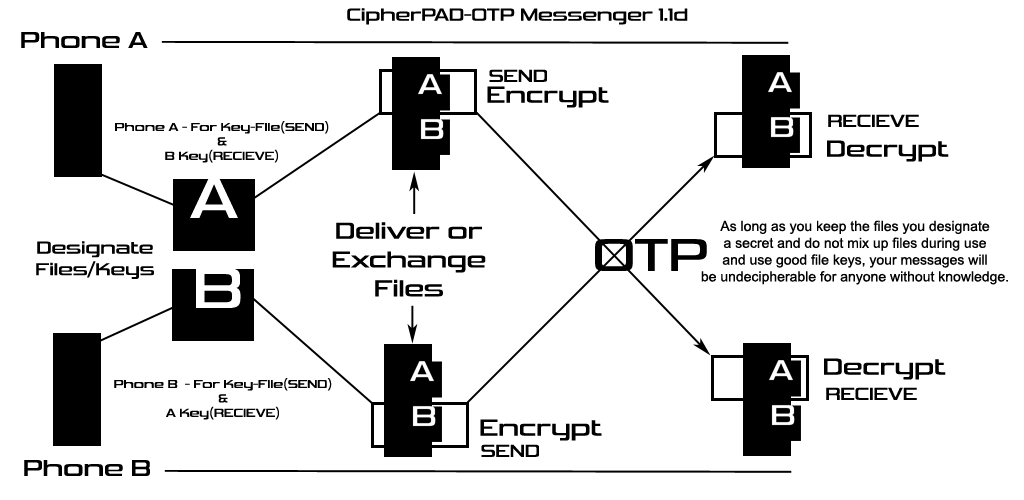
To establish secure communication endpoints, proper file partition and delivery methods must be enforced:
- Designate Key Files: Establish a set of unique files to serve as encryption keys. Clearly partition which files will be used by each party. For example, if utilizing 4 keys, designate 2 files exclusively for Party A's outbound messages and 2 files exclusively for Party B's outbound messages.
- Secure Delivery: Securely deliver the designated files to both Party A and Party B. Take careful note of which specific files are allocated for each side to use when operating in Sender mode.
2. Operating Instructions
To Encrypt and Send a Message:
- Open CipherPAD and select Encrypt.
- Select your designated outbound Keyfile. (Note: Upon its first encryption initialization, this key file will dynamically lock to your device as the Phone A / Sender pad).
- Input your plaintext, then tap Execute to generate the ciphertext.
- Copy the resulting encrypted string, paste it into your preferred messaging application, and transmit it to the recipient.
To Receive and Decrypt a Message:
- Copy the incoming ciphertext from your messaging application.
- Open CipherPAD, select Decrypt, and paste the ciphertext into the text field.
- Select the corresponding Keyfile assigned to the sender.
- Tap Execute to instantly decrypt and view the plaintext message.
3. Critical Security Protocol
⚠️ Critical Protocol for the Receiver (Phone B)
To maintain the perfect secrecy of the system, Phone B must never reuse a key file that has already processed an incoming message to encrypt an outbound reply.
Because the application processes data sequentially, encrypting a new message using a previously utilized receiver file will cause structural key overlap. Key reuse completely invalidates the mathematically uncrackable nature of a One-Time Pad.
- The Rotation & Exhaustion Rule: Depending on the size of your key file, you may use it to encrypt and send multiple outbound messages sequentially until the file's byte capacity is completely exhausted. Once a key file is exhausted, it must be permanently discarded.
- Pool Separation: You must strictly maintain separate pools: never select a file from your outbound "sending" pool to decrypt an inbound message, and never use a file from your inbound "receiving" pool to encrypt an outbound reply.
- Dynamic Role Swapping: Because sender and receiver roles are designated entirely by the specific file in use, your device's profile is highly flexible. The moment Phone B encrypts a message using a fresh, dedicated outbound key, the application will lock that file as a Sender pad, dynamically shifting that device's role to the Sender profile for that particular key.
4. Technical Security Disclosures
The mathematical strength of the application relies heavily on the underlying entropy of the files you select as keys.
Standard File Vulnerabilities
Standard consumer files—including localized photos, PDFs, text documents, and MP3s—possess inherent structural liabilities such as predictable file headers and repeating byte distributions. While these common files provide sufficient obfuscation for casual, recreational communication, they mathematically degrade absolute cryptographic entropy. For standard applications, these files remain secure provided that:
- Strict Confidentiality: The specific files selected to act as the encryption pads remain entirely secret.
- Strict Isolation: A single key file is never cross-utilized for both sending (Phone A) and receiving (Phone B) operations.
True Random Number Generation (TRNG) Upgrades
For environments demanding authentic, mathematically verifiable perfect secrecy, raw file structures should be replaced with true high-entropy data.
To achieve this, deploy the GMIENchic CAM-Crypt-TRNG companion application. This module interfaces directly with your device's physical camera sensor, harvesting quantum shot noise at the pixel level to generate cryptographically secure, true random files. The resulting key material achieves a 98.6% optimal rating across standard NIST statistical suites, delivering military-grade Arithmetic Mean balance and maximum Shannon Entropy.
Decipher (send guesses to info@minechic.com, include in subject:"OTP CONTEST" - get a free gift if you are correct)
0000B2EAEC6FDC7A9844CB295F0191FE62BB2CB7DCC492B019ED1
58A356D69E953A7F42C33BDD3F2900F1C3650005C28E02B8D8920
F80FB1AFE1763FEE5B3CE482114C7F1BC87515701F7EE6664CE8B
257CEB623432E8E669F6606526C8C4AB152CE40FD64EF6FF9D578
455972AB2CBDE6603AD52D90DB33817256B8E3B17F793975556C3
7CB537F93E238CA12BF9B5BF1732E7B664678BE378B36C5B49048
E99B2606F8C3351A342E20D25B1D3594BB4B3B2693AD81A983D12
52760A7AC25512F5E22F50155F89B1B65EBE1636D5E3D3372C42F
4EA446F2D5364E1F3B0B25E970F4207770E2E7690DC97C6948461
66051AF7640FF294E8075E82F2A20E4607623CE
5. Interactive Layout Demo
This layout demo visualizes how the application interfaces behave based on the user manual criteria. Use the tabs below to switch modes and preview execution behavior.
© 2026 MIENCHIC, LLC. All rights reserved.